
Something is missing from my library
When highlights, notes, favourites, plans or conversations don’t show: check the account, the confirmed address, the sync, and where each kind of item is listed.
On this page
What you keep is saved to your account, so it follows you from one device to the next. When something is not where you left it, the cause is usually that you are in another account, or that this device has not caught up yet. We can’t promise to bring back something that was deleted.
Check the account
Web
- Check that you are signed in. Signed out, the page says Sign in to keep your library. and highlights, favourites, notes and plans are not kept.
- Sign in the way you did the first time, with the same Google or Apple account or the same email address. Another way in, or Apple’s private address, can be a different account with nothing in it.
- Open Profile, then My account, and look at the address under Private info. Is it the one you expect?
- If it says Not confirmed, confirm it, because nothing is saved to the account until then. See Confirm your email address.
- Look at the line at the top of My account: Synced, Syncing… or Couldn’t sync. If it can’t sync, check your connection: your changes are sent when you are online.
App
- Check that you are signed in. Signed out, the You tab shows a Sign in button and nothing is kept beyond this device.
- Sign in the way you did the first time, with the same Google or Apple account or the same email address. Another way in, or Apple’s private address, can be a different account with nothing in it.
- Open the You tab, then My account, then your name (Edit profile), and look at the address under Private info. Is it the one you expect?
- If it says Not confirmed, confirm it, because nothing is saved to the account until then. See Confirm your email address.
- Look at the line at the top of My account: Synced, Syncing… or Couldn’t sync. If it can’t sync, check your connection: your changes are sent when you are online.
Where to look
The You page (the You tab in the app) opens on All, with everything newest first. Pills narrow it to one kind: Highlights, Passage notes, Notes, Plans, Favorites, Reading, Listening and Questions. A highlighted passage with a note on it is listed under Passage notes, not under Highlights, so nothing is listed twice.
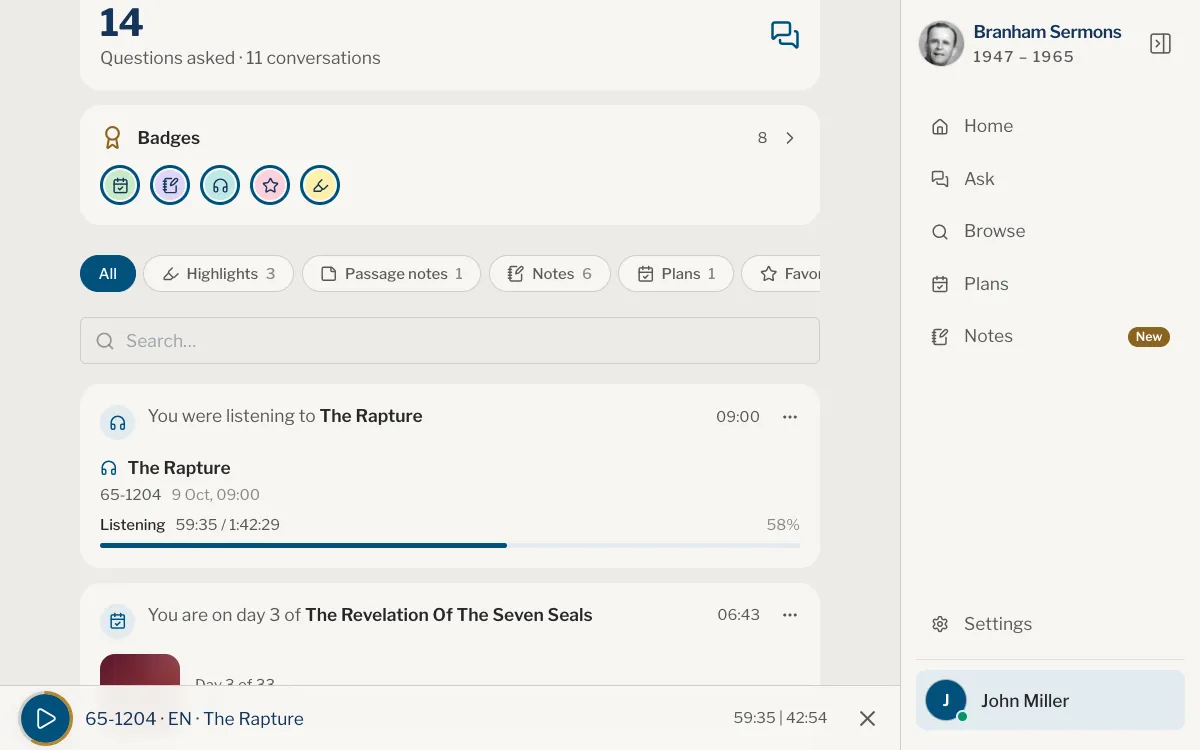
A conversation you archived is not listed under Questions: open the conversation list and choose Archived.
If something was deleted
- Deleting a highlight removes the note on it too, on every device. You are asked Delete this highlight? first.
- A deleted note from the Notes notepad waits 30 days in Recently deleted, under the row of folders in Notes. Open it there and choose Restore beside the note.
- Deleting a folder of conversations does not delete the conversations: you find them under All.
If it is still not there
Write to us and say what you expected to see: the kind of item, the sermon or plan, roughly when you made it, the address and the way in of your account, and your device. We will look into it, but we can’t promise to recover something that was deleted.
I signed out and my library is gone.
Signing out takes your library off the device, and it stays safe in your account: Everything stays safe in your account and will be back when you sign in again.
My new phone shows an empty library.
Sign in with the same account, then wait while Syncing… finishes. Your library arrives from your account.
I never had an account. Where are my conversations?
Without an account, what you keep stays on the browser or the device you used. Another browser, a private window or cleared site data starts empty.
Where did my highlight with a note go?
It moved to Passage notes. A passage is listed once, in one place.
Was this article helpful?
Still stuck?
Write to us with what you were doing and what you saw, and we will help.
Related articles
- Use your library on more than one deviceWhat follows your account to every phone, tablet and computer, what each device keeps for itself, and how to sign in on a second one.
- I can’t sign inWhat to check when sign-in fails, for Google, Apple, or email and password. How to reset a forgotten password, then the basics.
- Find your favourites, highlights, notes and plansEverything you keep, and everything you left half done, is on You: favourites, highlights, notes, plans, reading, listening and your questions, with one search.