
Choose your languages
The language of the screens, the languages of the sermons you read and the language of your questions are three separate choices. Here is where to set each.
On this page
Branham Sermons keeps three choices apart: the language of the screens, the languages of the sermons you read and hear, and the language of each question. You can have the app in one language and the sermons in another.
| Choice | What it sets | Where |
|---|---|---|
| The screens | The words on menus, buttons and messages | Settings, then Site language (website) or App language (app) |
| The sermons | The texts and recordings offered when you read, browse and listen | Settings, then Sermon languages |
| A question | The language of the answer | The language you write the question in |
The language of the screens
The website comes in English, French, Spanish, Portuguese, and Simplified and Traditional Chinese. The app is in the first four, and Chinese comes with its next version. Until you choose, the website opens in your browser’s language and the app in your phone’s, when they offer that language, and in English otherwise. A browser set to Chinese gets Traditional Chinese in Taiwan, Hong Kong and Macao, and Simplified Chinese elsewhere.
Web
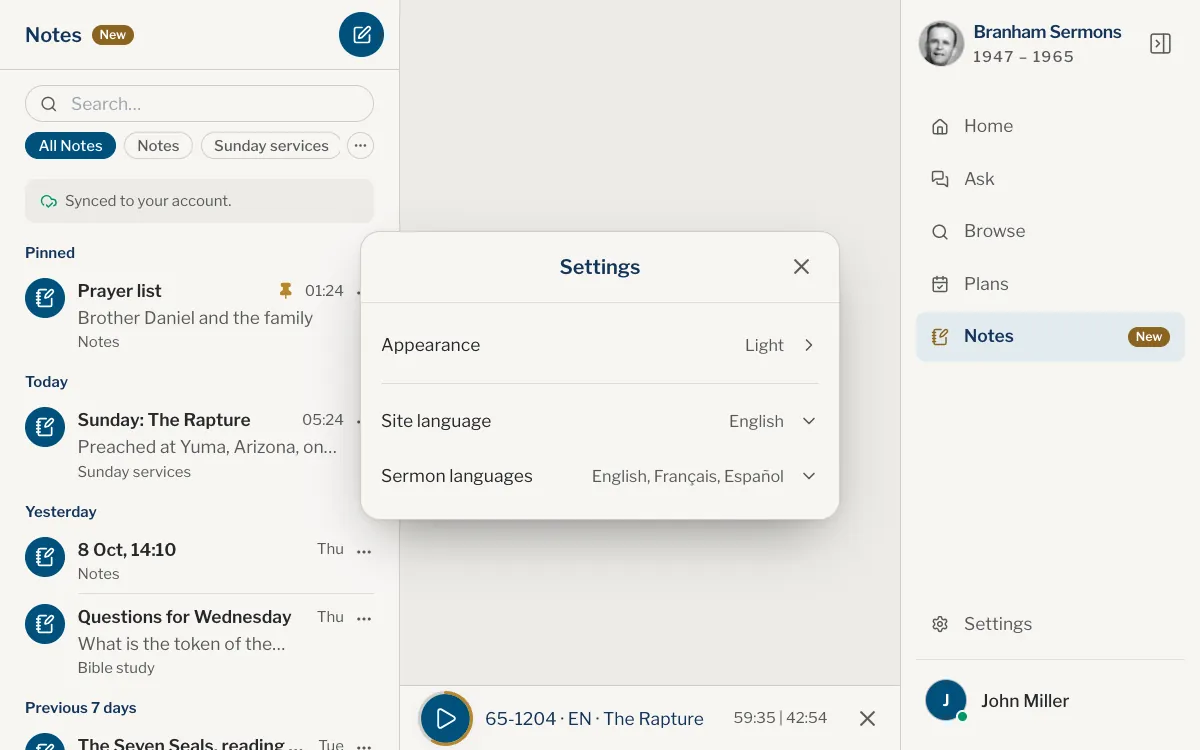
- Open Settings at the foot of the panel. On a phone, use the menu button at the top right first.
- Choose Site language.
- Pick a language. The same page opens in it.
App
- Open Settings: on iPhone, tap the gear on You; on iPad and Mac, choose Settings in the sidebar.
- Tap App language.
- Choose a language.
The languages of the sermons
English holds every sermon and French almost every one. Spanish, Portuguese, and Simplified and Traditional Chinese hold the sermons that have been translated. You keep the ones you want, up to five. Any of them can be taken off, as long as one is left.
The first time you open the website, Choose your languages comes up before the guided tour. Your browser’s language is already ticked, with English too when that is a different language. Tick up to five, then close it with the ✕ at the top right. If you had never chosen your languages before, it comes up once for you too, unless your account already holds a choice. The app has no such screen: you start with the app’s language and English, and a language you download is added to your list. You can change them at any time in Settings.
This list trims the menus you meet while reading: the Read menu in a sermon, the language menu in Browse, and Listen in in the player. When your list leaves out a language a sermon exists in, the menus end with More languages…, which takes you to the list so you can add it.
Choose your languages, Sermon languages in Settings and More languages… in the menus show the same list. English and French come first, then the other languages from A to Z, under a Find a language box. Each tick is kept at once, except in Choose your languages, which keeps your ticks when you close it with the ✕ at the top right.
Each language shows its name, with its own name beside it when that is different, such as Spanish and Español. Beside it are its versions: on the website each with the number of sermons it holds, in the app by name alone. A small icon marks the languages that have Read along, as the line above the list says.
Web
- Open Settings and choose Sermon languages.
- Tick the languages you want. Once you have five, the others are greyed until you untick one, and the last one left cannot be unticked.
- Close the list with the ✕ at the top right.
App
- Open Settings, as above.
- Tap Sermon languages.
- Tick the languages you want. Once you have five, the others are greyed until you untick one, and the last one left cannot be unticked.
If you switch the screens to a language the sermons are published in, that language joins your list, in place of another one if you already have five. When you are signed in, both choices follow you to your other devices.
The language of a question
Each question is answered in the language you write it in, whatever language the screens are in.
- In French, the answer comes from the French texts; in English, from the English texts.
- In Spanish or Portuguese, it comes from the translations of the sermons that have one, quoted as they read. A line under the answer says when the search also found sermons that exist only in English, and lets you see the answer from the English.
- In Chinese, it comes the same way from the sermons published in Chinese, in the characters you write in, Simplified or Traditional. A sermon published only in the other characters is quoted in its own, never converted.
- In any other language, the answer is in English, with a line saying that his sermons are not published in that language yet.
- A bare name or a sermon code shows no language, so the question follows the conversation.
The language of the screens only decides what you are offered, such as the example questions. If you write in French on an English site, or the other way round, a line under the box says which language the answer will come in, and offers to switch the site too.
Can I read the sermons in Spanish, Portuguese or Chinese?
Yes, for the sermons that have been translated. Add the language under Sermon languages, where Chinese is listed twice, Simplified and Traditional. A sermon with no text in your language opens in English, with a line saying so.
Why is a sermon shown in a language I did not choose?
Not every sermon exists in every language. When yours is missing, it opens in English, which holds all of them. See Languages and versions and Something is in the wrong language.
Do I have to switch the screens to ask in French?
No. Write the question in French and it is answered in French, from the French texts, even if the site is in English.
Why can I not add a sixth sermon language?
You keep up to five sermon languages, whichever you like. Remove one to add another.
Do my language choices follow me to my phone?
Yes, when you are signed in: the language of the screens and your sermon languages follow your account.
Was this article helpful?
Still stuck?
Write to us with what you were doing and what you saw, and we will help.
Related articles
- Read in another language or versionSwitch a sermon between English, French, Spanish, Portuguese and Chinese at the same sentence, and learn what the codes VGR, SHP, MH and MH-B mean.
- Something is in the wrong languageWhy the screen, an answer, a sermon text or a recording is in a language you didn’t expect, and where each one is changed.
- Settings: where they are and what they doOpen Settings on the website or in the app, and see what each setting changes: appearance, languages, reminders, the sermons kept on your device, and where Help is.