
Ask a question and read the answer
Describe what you are looking for in your own words and get an answer made only from the sermons, every point with its sermon and paragraph.
On this page
Ask is the quickest way in when you do not know the title or the date. Describe what you are looking for the way you would tell a friend: a story, a subject, a few words that stayed with you. The answer comes from William Branham's sermons, and every point names the sermon and the paragraph it rests on.
Ask your first question
Web
- Open Home or Ask from the menu on the right. On a phone, tap the menu button at the top right first.
- Type your question in the box that says Ask anything, or tap an example question.
- Press Enter, or the arrow button, to send. Shift and Enter start a new line.
- Read the answer as it appears, then tap a sermon and paragraph in it to read the passage.
App
- Tap Home or Ask in the tab bar, or in the sidebar on an iPad or a Mac. On Ask, tap the round New conversation button at the top of the list.
- Write your question in the box that says Ask anything, or tap an example question.
- Tap the arrow button to send. On an iPhone or iPad the return key starts a new line; on a Mac it sends.
- Read the answer as it appears, then tap a sermon and paragraph in it to read the passage.
Not sure what to ask? Home shows an example question under the box, and a new conversation on Ask offers one with Ask this. Tap it and it is asked at once, as often as you like.
What comes back
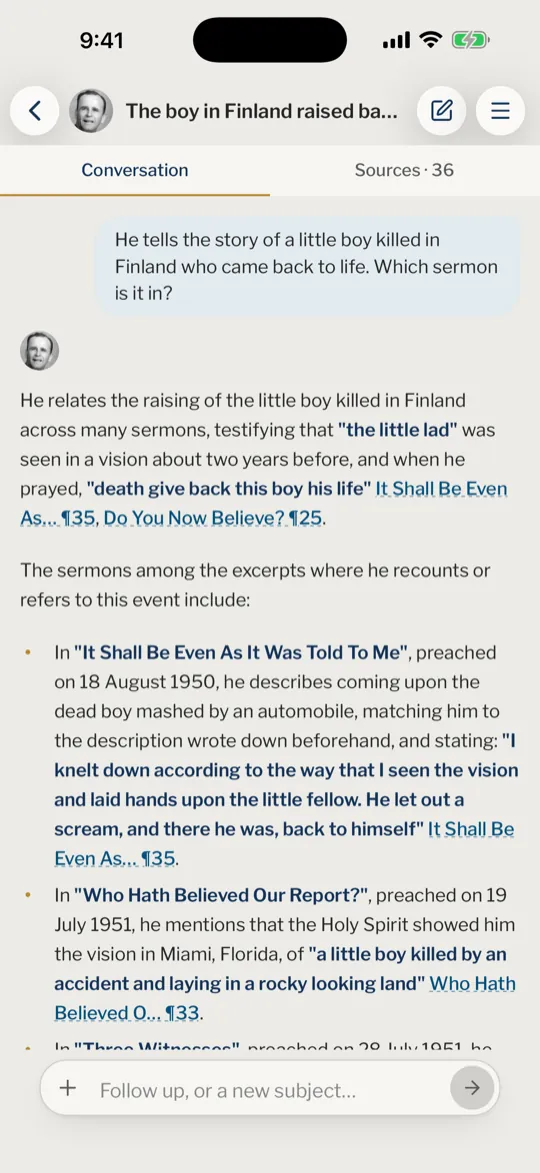
The answer opens with his own words that answer your question, then goes through what he says, each point with its sermon, its date and its paragraph. It is made only from passages found in the sermons. Nothing is added from outside, and the assistant gives no opinion of its own.
Each sermon and paragraph named in the answer is a link. Tap it to read the passage with the paragraphs around it, and Open the sermon takes you to that paragraph.
Under the answer you can copy it, share it, and tell us whether it helped. Sources and follow-up questions shows where all the sources are kept.
The language you write in
Write in the language you like. The answer follows it, whatever language the site is set to, and comes from these texts:
- French: the French texts, answered in French.
- English: the English texts, answered in English.
- Spanish or Portuguese: the sermons published in that language, quoted as they read there. A line under the answer says how many more sermons the search found that exist only in English, with a button to see the answer from the English. Ask about a sermon your language does not have yet and the answer comes from its English text, in English, with a line saying so.
- Chinese: the sermons published in Chinese, quoted as they read there, answered in the characters you write in, Simplified or Traditional. A sermon published only in the other characters is quoted in its own, never converted. The same line and button follow the answer.
- Any other language: the English texts, answered in English, with a line saying that his sermons are not published in your language yet.
If you ask in French on a site that is not in French, or in English on a French site, a note under the box says which texts will answer and offers to switch the site too. Choose your languages covers the site's own language.
Without an account
You can ask without an account: a few questions of your own each day, and the example questions as often as you like. A confirmed account has more room, and keeps your conversations on every device.
When the day's questions are used up, the box says so and offers to sign in or create an account. The sermons stay open to browse and read. Daily limits has the details.
Do I need an account to ask?
No. Without one you get a few questions of your own each day, and the example questions as often as you like. When only a few are left for the day, a line under the box tells you. An account with a confirmed email address has more room and keeps your conversations on every device.
The box asks me to sign in. Why?
The questions you can ask without an account today are used up. Sign in or create an account to keep asking, or carry on in Browse. If you already have an account and the box asks you to confirm your email address, see Confirm your email address.
Can I ask in French, Spanish, Portuguese or Chinese?
Yes. Write in the language you like and the answer comes in that language, from the texts described above. To ask a question again in French or English, type "in French" or "in English" after an answer.
What can I ask about?
Anything about William Branham's sermons, in your own words. A greeting or small talk gets one line asking for a question about the Message, and a question with words that do not belong here is not answered.
What if I lose my connection?
Asking needs a connection. A question that was on its way when the connection dropped is asked again by itself as soon as you are back online.
Was this article helpful?
Still stuck?
Write to us with what you were doing and what you saw, and we will help.
Related articles
- Sources and follow-up questionsOpen the sermon passages behind an answer, move between answers, and ask a follow-up that narrows the answer or starts a new subject.
- Word your questions to find the right passagesThe details to give, when to ask for the idea or the exact words, how to ask for a summary or for sermons, and what to do when an answer misses.
- How answers are made, and how to check oneIn plain steps: how your question is looked up in the sermons, what the AI model is given, why every point has a citation, and how to check or report an answer.