
Sources and follow-up questions
Open the sermon passages behind an answer, move between answers, and ask a follow-up that narrows the answer or starts a new subject.
On this page
Every answer rests on passages from the sermons, and the Sources keep them in one place: the sermon, the date, the paragraph and the first lines of each passage. Use them to check an answer, or to carry on reading where it points.
Open the sources
Web
- Tap the sources button under an answer, for example 5 sources.
- Or tap Sources at the top of the conversation. When the window is narrow, it is a tab beside Conversation.
- Tap a source to open the sermon at its paragraph, or Read around it to see the paragraphs before and after.
- To go back, tap Conversation, or Sources again when it is a button.
App
- Tap the sources button under an answer, for example 5 sources.
- Or tap the Sources tab beside Conversation. On an iPad or a Mac with room, Sources is a button at the top that opens them beside the answer.
- Tap a source to open the sermon at its paragraph, or Read around it to see the paragraphs before and after.
- To go back, tap Conversation, or Sources again when it is a button.
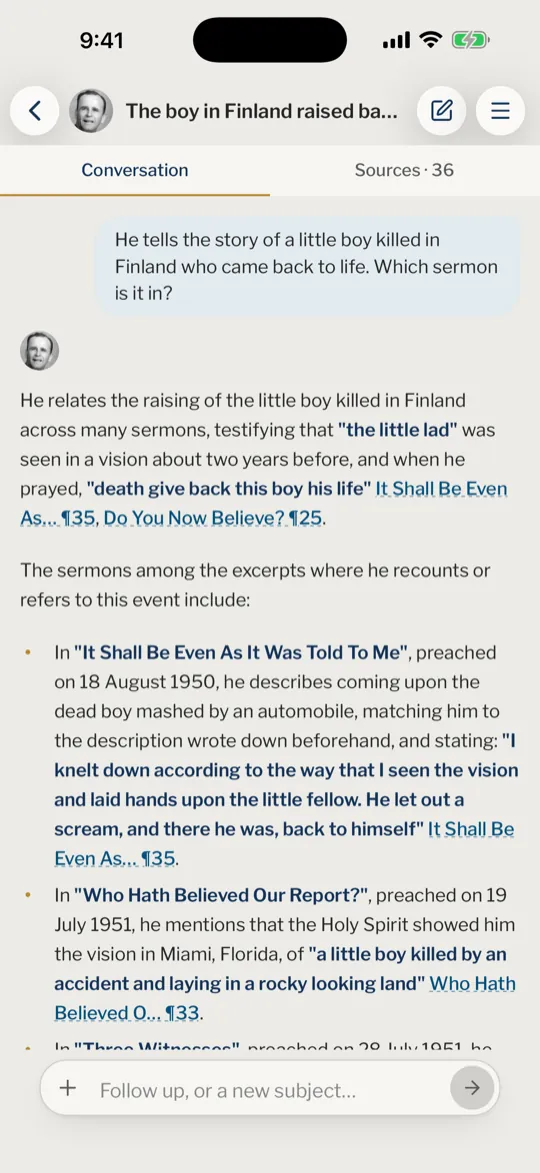
The number on the Sources tab counts every source of the conversation, while the button under an answer counts that answer's own. Each source shows the sermon's title, its date, its code and the paragraph, with the first lines of the passage. Codes and paragraphs explains how to read a code such as 63-0318.
Move between answers
The Sources show one answer at a time, headed by the question that was asked. When several answers in the conversation have sources, use the ‹ and › buttons at the top (Previous question and Next question) to move between them. The button under an answer takes you to that answer's sources directly.
Ask a follow-up
Once there is an answer, the box reads Follow up, or a new subject…. Write the next question there, in the same conversation.
- A follow-up such as "and when was that?" or "what about the mother?" is understood from the conversation, so you can leave out what you have just said.
- A question on another subject is recognised as new and answered on its own, as a first question, without the earlier subject leaking in. You do not have to start a new conversation for it.
- To start fresh yourself, tap New conversation.
Under the latest answer, More passages and Different passages may appear when his sermons hold more on the question. More passages gives the next ones, Different passages gives some from sermons not cited yet, and neither repeats a passage already given in the conversation. Both need a confirmed account.
How many sources does an answer have?
There is no fixed number. An answer has one source for each paragraph it cites, and the count under it says how many.
Does a source open the whole sermon?
It opens the sermon at that paragraph. Use Read around it first if you only want to check the passage in its place.
Why are there no sources under an answer?
Nothing in the sermons clearly answered the question, so nothing was cited. Try asking it in other words, or hold it to a sermon. Better questions shows how.
Can I go back to the sources of an earlier answer?
Yes. Use ‹ at the top of the Sources, or tap the sources button under that answer.
Do I need an account for More passages?
Yes, an account with a confirmed email address. Without one, the line under the answer invites you to sign in.
Was this article helpful?
Still stuck?
Write to us with what you were doing and what you saw, and we will help.
Related articles
- Ask a question and read the answerDescribe what you are looking for in your own words and get an answer made only from the sermons, every point with its sermon and paragraph.
- Hold a question to chosen sermonsChoose up to three sermons by title or code so the answer comes from those alone, and clear the choice when you want to ask of them all.
- Sermon codes and paragraph numbersWhat a code such as 57-0325 and a mark such as ¶33 mean, where they show, and how to find, cite and copy a passage with them.