
Follow a plan day by day
Open each day’s reading, stop where it ends, mark it read and move on, and change language, time or reading mode without losing your place.
On this page
A plan’s page shows today’s reading and the days around it. Open it each day to read, see where to stop and mark the reading done. The website and the app work the same way.
Open the day’s reading
- Open Plans and choose your plan under My plans. You can also tap its card on Home.
- Under the strip of days, tap the reading, or Start reading.
- Read, or listen, until the line that marks the end of the day’s reading.
- Tap the round check in the bar at the foot of the reader to mark the reading read.
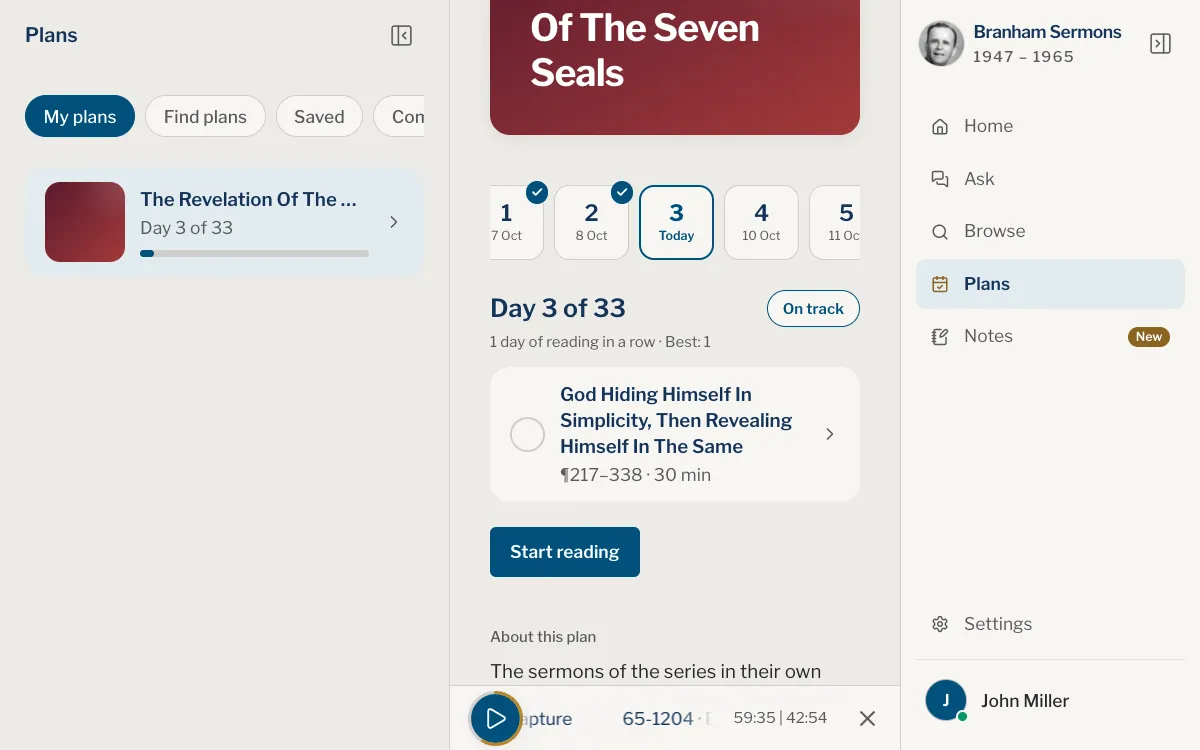
The page opens on today’s day, or on the first day you have not read if you have fallen behind. Each day in the strip shows its date and a mark: read, missed or still to come. Tap any day to see what it reads.
Each reading opens in the sermon under a line that names the day, at its first paragraph, or where you stopped if you have begun it and not yet marked it read. The text outside the day’s reading is dimmed, and a line marks where to stop. A recording timed against its text starts at the day’s reading and pauses at that line; press play to carry on (see Read along).
Readings from a plan stay out of Continue reading and Continue listening: the plan keeps your day, and your place in the text and in the recording, apart from what you read or hear elsewhere. A ring round the check at the foot of the reader fills as you read down the text or listen to the recording, whichever has gone further, and the plan’s page shows how far you are into a reading, such as 40% read. When you have read ahead of the recording, play carries on from where you are reading.
Mark a reading read
Reaching the end of the text does not mark a reading by itself. Tap the round check in the bar at the foot of the reader, or the circle beside the reading on the plan’s page. Tap the circle again to mark it unread.
When the day has more readings, the check fills, a strip along the top of the bar shows the readings done, and the next one opens. The last reading of the day opens a window that says Reading done, with your streak and the plan’s progress, and Back to the plan. The next day starts from the plan’s page, where Go to day 5 takes you to it.
To move between the day’s readings, pull the text left or right: the reading you are going to shows at the side as you pull, such as 2 of 3. The arrow at the left of the bar goes back one. On a phone, the bar slides away as you scroll down and comes back as you scroll up.
Where you stand
Beside Day 4 of 33, a pill says On track, 2 days ahead, or how many days you have missed. Under it, a line counts your days of reading in a row, and your best.
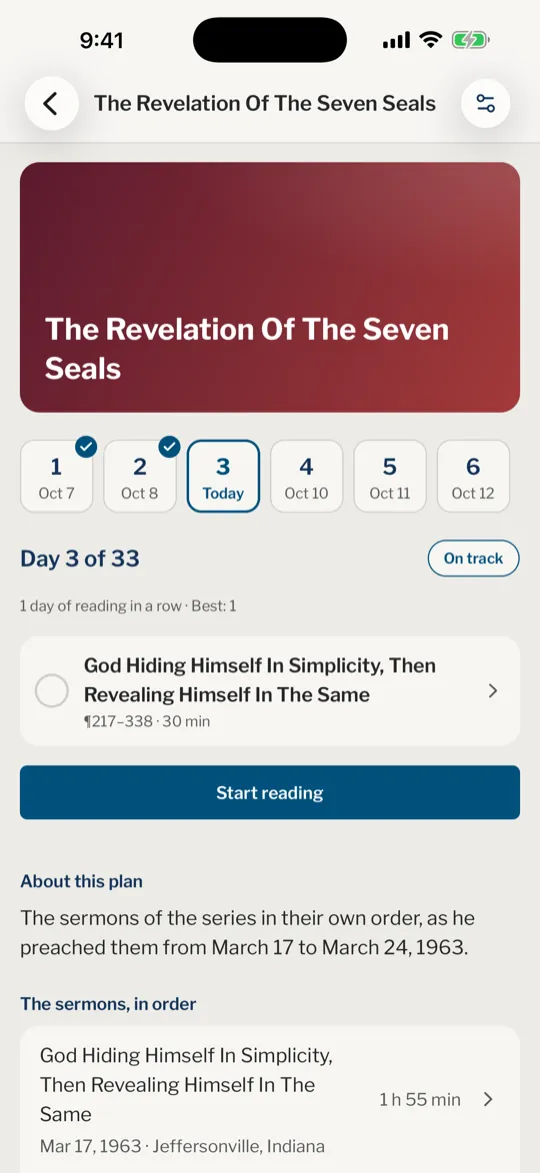
The pill opens the plan’s settings, and so does the round Settings button at the top of the page. They show how far you are, the start and end dates and a Calendar of every day; tap a day in it to see what it reads.
Change or leave a plan
In the settings, choose another Plan language, switch between Reading and Listening, or pick another time a day. Changing any of these keeps your place in the plan.
To leave a plan, choose Stop this plan in the settings and confirm. Your progress is lost on all your devices. When every reading is done, the plan moves to Completed, where Start again begins it afresh.
I missed some days. What now?
Read them when you can, or move the plan forward with Catch me up. See Catch up when you fall behind.
Why does my plan open on an earlier day than today?
It opens on the first day you have not read. Tap a later day in the strip, or choose Go to day 5, to move on.
Can I read ahead?
Yes. Tap a later day in the strip and read it. The pill then says how many days ahead you are.
I ticked a reading by mistake.
Open the plan’s page and tap the circle beside the reading again.
Can I read my plan without a connection?
In the app, the text of the coming days is kept on your phone while you follow the plan, so it opens without a connection. On the website, the texts of your plans are kept once you keep the sermons on the device in Settings, under Sermons on this device. See Offline library.
Was this article helpful?
Still stuck?
Write to us with what you were doing and what you saw, and we will help.
Related articles
- Choose a reading plan and start itPick a series, a year of sermons, the Church Age Book or every sermon in order, choose the time a day, read or listen, and start. Starting a plan needs an account.
- Catch up when you fall behindSee how many days you have missed, move the plan forward with Catch me up, or turn missed days off so the plan simply opens on your next reading.
- Reminders and notificationsTurn on the quote of the day, the evening reminder and reading plan reminders in the app or on the website, allow notifications, and see what the bell on Home is for.