
Browse the index of every sermon
Open the index of every sermon, list it by date, title, length, series or place, find one by name and open it.
On this page
The index lists every sermon. Use it when you know a title, a date or the place where he preached, or when you want to follow a whole series from its first sermon to its last. It is in the Browse tab.
Open the index
Web
- Choose Browse in the sidebar. On a phone, open the menu at the top right and choose it there.
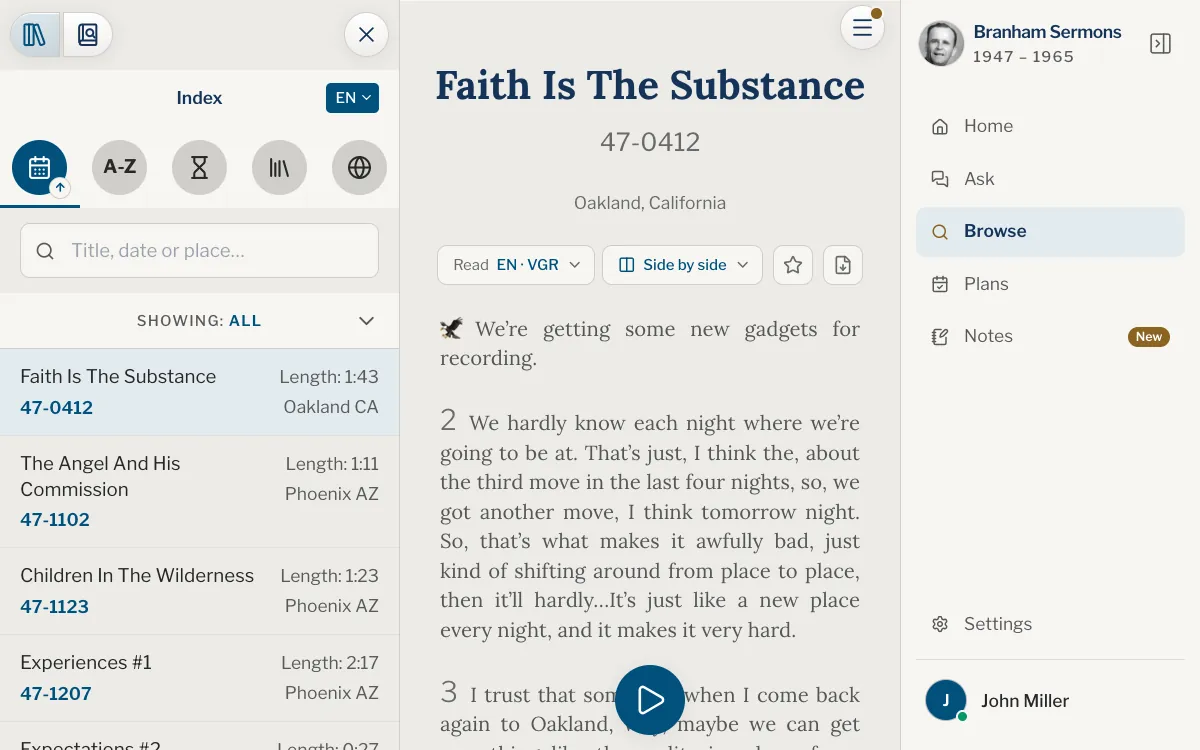
- On a wide screen the index is open on the left, beside a sermon. On a narrower one, tap Open the index and search at the left of the bar above the sermon.
- If the search is showing, tap Index, the button with books on a shelf, at the top of the panel.
App
- Tap the Browse tab.
- On iPad and Mac the index is open on the left, beside a sermon. On iPhone, tap Open the index and search at the left of the bar above the sermon.
- If the search is showing, tap Index, the button with books on a shelf, at the top of the panel.
List the sermons
Choose how they are listed
Five round buttons run along the top of the index. Each one lists every sermon in its own order, and a small arrow on the lit button shows which way the list runs.
| Button | Lists | Narrow it by |
|---|---|---|
| Calendar, By date | The sermons, oldest first | A year |
| A-Z, By title | The sermons, in alphabetical order | The first letter of the title |
| Hourglass, By length | The sermons, shortest first | A span of ten minutes |
| Library, By series | The series, such as the Seven Seals or the Church Ages | A series, which then lists its sermons |
| Globe, By place | The places, by name | A place; a state, a province or a country opens to its towns first |
Tap the lit button again to turn the list round: newest first, Z to A, longest first. On a computer, pointing at a button shows its name.
Narrow the list
On By date, By title and By length, a bar under the buttons says what the list shows, Showing: All. Tap it to open a grid of the years, the letters or the lengths, then choose one. Lengths come in spans of ten minutes: 1:30 holds the sermons that run from 1:30 to 1:39.
On By series and By place, tap an entry to see only its sermons, and Back at the top of the list to return. A state, a province or a country opens to its towns, with All towns at the top for the whole of it.
Find one by name
The box under the buttons finds a sermon by its title, its date or its place, and accents do not matter. Type words of a title in any order, a town, or a code with or without its dash: 57-0325 or 570325 is March 25, 1957, and 57-03 lists the sermons of March 1957. A date written out works too: 25 March 1957, 3/25/1957, March 1957 or 1957.
Over By series or By place, the same box looks for a series or a place by its name. Sermon codes and paragraph numbers explains how a code reads.
Open a sermon
Tap a row to open that sermon. A row gives the title with its code under it, and on the right the length and the place; whatever the list is ordered by is in bold.
On a wide screen the sermon opens beside the list. On a phone it fills the screen, and the index waits behind the button at the left of its bar. Browse always keeps a sermon open: the last one you opened from it, or the first on the list the first time.
Adjust the panel
The chip at the top right of the panel, such as EN or FR, names the texts the list shows. Tap it to look into another of your Sermon languages, or choose More languages… to add one (see Choose your languages). Until you choose, the texts follow the language you use the site or the app in, when it is one of your Sermon languages. Otherwise they are in English, or in the first of your languages when English is not one of them.
A language that holds only some of the sermons says how many, and the rest can be read in English, which holds every sermon.
On a computer, or on an iPad or Mac with room to spare, drag the panel’s right edge to make the index wider or narrower, and double-click it (double-tap in the app) to bring back the usual width. The width is kept on that device.
Beside a sermon, the ✕ at the top right of the panel puts it away to give the sermon the whole width, and the button at the left of the sermon’s bar brings it back.
Why does Browse open a sermon when I have not chosen one?
Browse always keeps a sermon open next to the index: the last one you opened from it, or the first on the list the first time. Open the index and choose another whenever you like.
How do I find a sermon if I only know the year?
Choose By date, tap the Showing bar and choose the year. That year’s sermons come oldest first.
The sermon I am looking for is not on the list. Why?
The list shows the texts of the language on the chip. A sermon that is not translated yet is missing there, but English holds every sermon: tap the chip and choose English, or More languages… to add it when it is not one of yours.
The list does not load. What can I do?
Offline, the app and the website list from the sermons kept on the device, when you have kept them: see Offline library. Without them, the index loads as soon as you are back online, and if it says it could not be loaded, tap Try again.
Can I search the words of the sermons from this box?
No, this box looks at titles, dates and places. Open Search, the second button at the top of the panel, and see Search the words inside the sermons.
Was this article helpful?
Still stuck?
Write to us with what you were doing and what you saw, and we will help.
Related articles
- Search the words inside the sermonsFind a passage by the words in it, with keywords or an exact phrase, in every sermon or in the one you are reading, with suggestions as you type and a history of your searches.
- Sermon codes and paragraph numbersWhat a code such as 57-0325 and a mark such as ¶33 mean, where they show, and how to find, cite and copy a passage with them.
- Open a sermon and read itHow a sermon opens, what the top bar and the ☰ menu hold, and how to move through the text: paragraph numbers, the star, the PDF, scrolling and jumping.