
Search the words inside the sermons
Find a passage by the words in it, with keywords or an exact phrase, in every sermon or in the one you are reading, with suggestions as you type and a history of your searches.
On this page
Search finds the paragraphs where your words appear, in every sermon or in the one you are reading. Use it when you remember some of his words, a name or a place, but not the title. When you do not remember his words, ask a question instead.
Run a search
Web
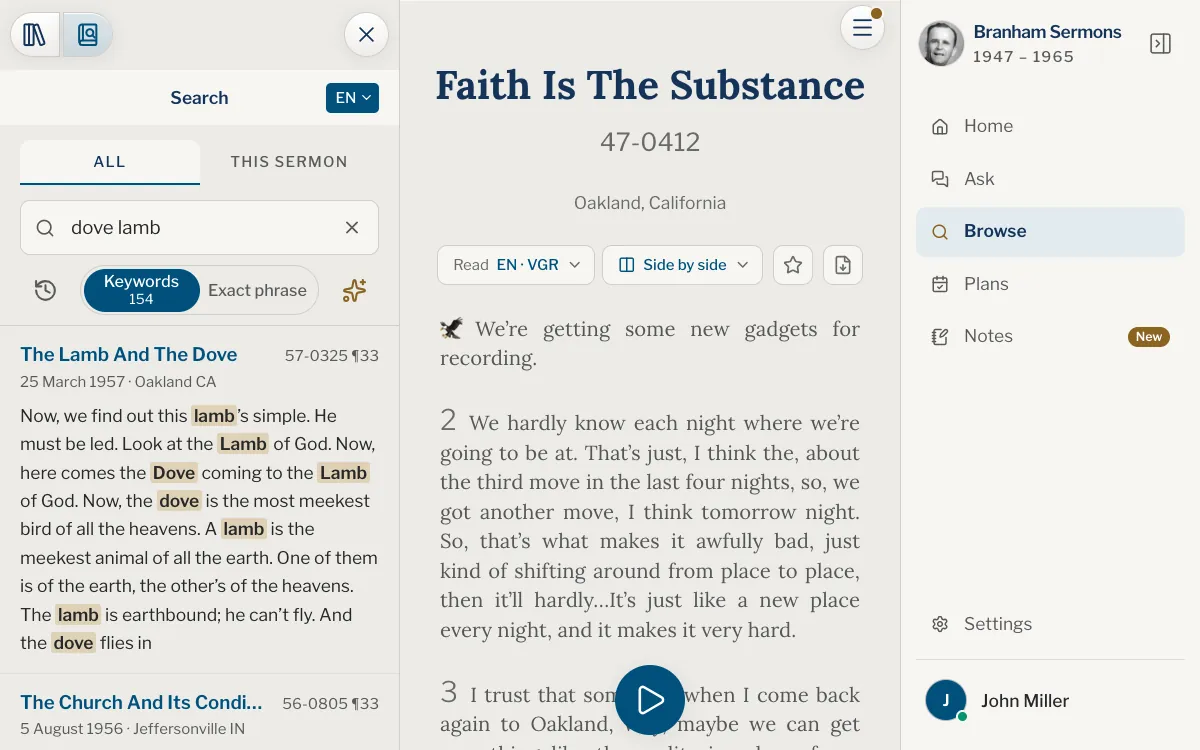
- Open Browse, then choose Search, the second button at the top of the panel. If the panel is hidden, tap Open the index and search at the left of the sermon’s bar first.
- Type your words in the box. Two letters are enough to begin, or one character in Chinese.
- Choose Keywords or Exact phrase under the box.
- Press Enter, or tap a line the box offers, to run the search.
- Tap a result to open the sermon at that paragraph.
App
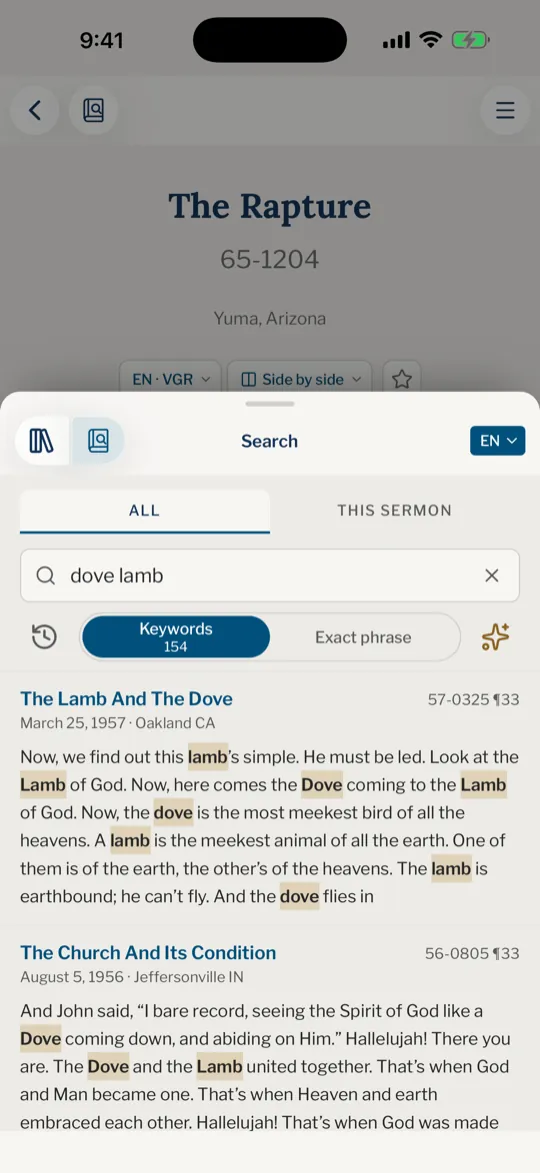
- Tap the Browse tab, then Search, the second button at the top. On iPhone, tap Open the index and search at the left of the sermon’s bar first.
- Type your words in the box. Two letters are enough to begin.
- Choose Keywords or Exact phrase under the box.
- Tap the search key on the keyboard, or a line the box offers, to run the search.
- Tap a result to open the sermon at that paragraph.
Before you type, the panel offers two examples, and a tap on one shows how it works. As you type, the list under the box gives your search with the number of passages it holds, then the words your last word could become, each with its own number.
A result gives the sermon’s title, its code and paragraph (57-0325 ¶33), its date and place, and the words around your match with your words marked. Opened, the sermon marks only the words of that passage. Tap Show more at the end of the list for more results.
Keywords or exact phrase
| Button | Finds a paragraph when | Try |
|---|---|---|
| Keywords | It holds every word, in any order | dove lamb |
| Exact phrase | It holds the words side by side, in this order | the end time |
Each button carries a number, the passages it finds. A number with a + means at least that many.
- Capital letters and accents do not matter.
- A word matches itself whole: man finds man, not many.
- In a search of several words, the last one stands for every word it begins while you are still typing it: son of ma also finds man and many. A single word is always taken whole.
- A space after the last word says it is finished, so it is taken whole.
Search one sermon
With a sermon open, the top of the panel offers All and This sermon. Choose This sermon to look only in the sermon you are reading. The same box and buttons work, and each paragraph that holds your words is listed with its ¶ number.
The bar under the buttons says where you are among the passages, for example 2 / 14. Press Enter (or the search key) again to go to the next one, use the two arrows, or tap a paragraph in the list. Nothing is marked in the text until you choose one, and then only its words.
In This sermon, you can type a paragraph number instead of words: that paragraph is listed as the match.
Past searches and the texts searched
The clock button, at the left of the Keywords and Exact phrase buttons, opens History: the searches you ran, the latest first, each with its way of searching and its language. Tap one to run it again, the ✕ to remove it, or Clear all to empty the list. An account keeps them on every device you sign in on; signed out, nothing is kept.
The chip at the top right of the panel, such as EN, names the texts searched, and a result opens in those texts. Tap it to search another language of yours (see Choose your languages). When nothing is found, a button offers the same search in the other texts with the number of passages it would find.
When you do not remember his words
Sometimes the words you remember are not the ones the sermon used. The sparkle button, at the right of Keywords and Exact phrase, carries your search to the assistant: a box opens with your words in it, and you write your question in your own way and tap Ask.
The question is asked of every sermon, or of the one you were searching when This sermon is chosen, and the answer opens as a new conversation. See how to ask a question and how to write a better one.
Do I need an account to search?
No, searching is open to everyone and does not use up your questions. An account keeps your history, and the sparkle button needs one once the few questions a day you are given without an account are used.
Is there a limit on searches?
Ordinary use does not run into one. If a message ever says you have reached today’s allowance, wait a while or read Daily limits.
Why does my search find nothing?
A word is matched whole, so a plural or a form you did not type is another word. Try fewer words, Keywords if you chose Exact phrase, or the other language’s texts.
How do I find a sermon by its title or its code?
Search looks inside the texts. For a title, a date or a place, use the box of the index. A code typed in the search box opens its sermon: see Sermon codes and paragraph numbers.
Can I search in another language?
Yes. Tap the chip at the top right of the panel and choose another of your Sermon languages; its texts are searched, and a result opens in them.
Was this article helpful?
Still stuck?
Write to us with what you were doing and what you saw, and we will help.
Related articles
- Browse the index of every sermonOpen the index of every sermon, list it by date, title, length, series or place, find one by name and open it.
- Word your questions to find the right passagesThe details to give, when to ask for the idea or the exact words, how to ask for a summary or for sermons, and what to do when an answer misses.
- Sermon codes and paragraph numbersWhat a code such as 57-0325 and a mark such as ¶33 mean, where they show, and how to find, cite and copy a passage with them.